HIS 367: War and Society

Welcome!

This course studies various United States military engagements with an emphasis on the ways in which these conflicts shaped the United States and global landscapes.

File:Kay Francis and Mitzi Mayfair pose in their traveling costumes after USO Camp Show overseas (34244884953).jpg

Kay Francis and Mitzi Mayfair pose in their traveling costumes after USO Camp Show overseas
 

American Legion Digital Archives

The American Legion Digital Archive provides full-text access to The American Legion magazine, national meeting digests, newsletters, press releases, and other publications published by the national organization. Additionally, the Digital Archive contains the ruling documents of The American Legion including current resolutions.


Anne S. K. Brown Military Collection

 The Brown University Library Center for Digital Scholarship presents several prints, drawings, and watercolors from the Anne S. K. Brown Military Collection. This collection is available to browse by category and choose those relevant to the topic and time period of your research.

Prints, Drawings & Watercolors from the Anne S. K. Brown Military Collection

Betty H. Carter Women Veterans Historical Project

The Betty H. Carter Women Veterans Historical Project documents the contributions of women in the military and related service organizations since World War I. The project includes a wide range of source material including photographs, letters, diaries, scrapbooks, oral histories, military patches and insignia, uniforms, and posters, as well as published works.


Digital Public Library of America

 Discover over 53 million images, exts, videos, and sounds from across the United States in the collections of the Digital Public Library of America.

Digital Public Library of America

Japanese American Military History Collective

The central purpose of the Japanese American Military History Collective is to assemble, digitize, and make web-accessible historical documents and oral histories of the Japanese American military experience in World War II.


National Archives

The National Archives & Records Administration (NARA) allows users to explore the United States' history through their documents, photos, and records.

National Archives and Records Administration - Wikipedia

The National WWI Museum and Memorial

The National WWI Museum and Memorial is America's leading institution dedicated to remembering, interpreting and understanding the Great War and its enduring impact on the global community.

The National World War 1 Museum and Memorial

The National WWII Museum

The National World War II Museum is home to thousands of oral histories and hundreds of thousands of photographs. 

The New York Historical

 The New York Historical is New York's first museum, documenting over 400 years of American history through a collection of art, documents, and artifacts. 


The New York Historical

New York Public Library Digital Collections

Explore over a million items digitized from the New York Public Library's Digital Collections. This site is a living database with new materials added everyday, featuring prints, photographs, maps, manuscripts, streaming video, and more.

Pacific Asia War Archive

As part of Pacific Atrocities Education's mission to increase awareness about atrocities committed in the Asia-Pacific Theater of World War II through public history projects, the Pacific Asia War Archive enables those interested about this topic to independently research and discover more about the history. The Pacific Asia War Archive's rapidly growing collection includes declassified wartime documents, first-hand testimonies from wartime survivors and soldiers, and more. The topics of the archive include-- but are not limited to-- biological weapons, comfort women, Rape of Nanking, Burma-China-India, Resistance in the Philippines, and China during World War II.

Shappell Manuscript Foundation

The Shapell Manuscript Foundation is an independent educational organization dedicated to the research, collection, and exhibition of original manuscripts and historical documents.


Smithsonian Collections

The Smithsonian Institute's collections represent our nation's shared history, art from acroos the globe, and the immense diversity of the natural and cultural world. Browse the collections to find primary sources relevant to the United States' society as a result of the nation's wars.

Home

University of Hawai'i at Mānoa Archives

Hamilton Library of the University of Hawai'i at Mānoa's Archives contain a broad range of materials from Hawai'i's Congressional Papers to manuscripts of the people, culture, and politics of Hawai'i, such as Hawai'i's war records, Japanese-American Veterans, and the records of the Institute of Pacific Relations and more, as well as materials which pertain directly to the university.


Accessing a Physical Book

Thrift Library is home to over 70,000 books. They can be very helpful when researching and working on projects. But how do you access them? Here is simple guide showing the two main ways of finding a physical book. 

Step 1: Search for the book

Begin by looking in the Thrift Library catalog. You can then narrow your search from the results page. This video gives you a quick tutorial:

Simple Search:
You can do a simple search by entering the book title and/or the author into the search box. If you want to find books on your topic, enter 1-3 keywords that describe your topic. Keyword examples: ancient Greek vases; Vincent van Gogh; sculpting in the 19th century; Chinese wall hangings. 

Advanced Search:
For more precise searching use the Advanced Search. Click "Advanced Search" to the right of the search box. Fill out the boxes to limit to specified fields like Title or Author. 

Physical Items:
From the search results page you can limit your results to physical books held by Thrift Library. Look to the left side of the page under "Refine my results" and select the following options:
Under Resource Type, select Books
Under Availability, select Held by library

Step 2: Locating the book

Once you have identified the book you wish to use, note the call number (example: LC3731.F45 2002) and navigate to the stacks (shelves) on the second floor of the library. There is signage there to direct you in finding the items according to its call number.

Library of Congress Classification System
A call number is like an address for a book. It tells you exactly where to go to find the book on the shelf. The call number is made up of letters, whole numbers, decimals, a publication date, and occasionally a volume and/or copy number. This allows for each book to have a specific location. One book's location cannot be confused with another book's location. 

Thrift Library uses the Library of Congress Classification System; here is an example: LA 212 .R423 2005
LA specifies the subject classification (L for Education and A for History, so History of Education).  
212 is read as a whole number. 
The next line, .R423, is called the Cutter number. This line is read as a decimal (.R423 would come after .R76). 
2005 is the publication date.  

Step 3: Checkout

Once you have acquired your book, you are free to peruse it at your leisure. If you have finished using it while you are here, return it to the desk. If you want to take it with you, you can check it out. All you have to do for that is to come to the front desk with your student ID, which serves as your library card. Someone should be there to assist you. They will then check out the book and let you know about the due date for return, and  you can check that by signing into the catalog at any time after checking out!

PASCAL and Interlibrary Loan

If Thrift does not have something you are looking for, you can request it from other libraries! 

PASCAL Delivers

PASCAL Delivers is a FREE, rapid delivery interlibrary loan (ILL) service for print books and digitized copies of journal articles and book chapters. 

  1. Use the catalog as you normally would (i.e. the above instructions.)
  2. If you cannot find the item(s), enable "Add results available through interlibrary loan" under the "Refine my results" menu on the left side of the page: 
  3. Click on the title of the item you would like to request and click the appropriate button to open the PASCAL Delivers Request Form. Make sure that the bibliographic data you provide in the form is complete and accurate. 
  4. Physical books will arrive at the PASCAL library location you selected within 2-14 days. You will receive an email when your items are ready for pickup. Digital items will be emailed directly to your AU email account, typically within 1-5 days.

ILL Request Options

All loaning systems in addition to PASCAL can be found here

For any questions about these services, you can contact reference@andersonuniversity.edu.

Reading LOC Call Numbers

  1. Visit the second floor of Thrift Library, where you'll find the stacks!
  2. Look at the first letter(s). Books are arranged in alphabetical order.
    • N comes before P
    • PL comes before PN
    • Browse the signs on the end of the bookshelves to find your section
  3. When you find the correct shelving area, scan over the numbers on the spine label (102 is one hundred two, not 1-0-2).
  4. After that number, search alphabetically from the other letter after the decimal.
  5. Some copies are arranged by publication date as well, the year will appear at the end of the call number. 

Example

NB 1115 .A32 2020

NB is the section to search for, in alphabetical order between NA and NC

1115 is the numbers before the decimal in numerical order on the shelf.

A32 after the decimal will be in alphabetical and then numerical order.

2020 is the publication year. If another edition of the same book was published in 2018, the two copies will be right next to each other with 2018 appearing first because they are shelved in chronological order.

Accessing E-Books and articles

Begin by looking in the Thrift Library catalog. You can then narrow your search from the results page.

 This video gives you a quick tutorial:

Simple Search
You can do a simple search by entering the book title and/or the author into the search box. If you want to find books on your topic, enter 1-3 keywords that describe your topic. 

Keyword examples: ancient Greek vases; Vincent van Gogh; sculpting in the 19th century; Chinese wall hangings.

Advanced Search
For more precise searching use the Advanced Search. 

Click "Advanced Search" to the right of the search box

Fill out the boxes to limit to specified fields like "Title" or "Author." 

Limit Search Results to E-Books
From the search results page you can limit your results to electronic (digital) books held by Thrift Library.

Look to the left side of the page under "Refine my results" and select the following options:

  • Under "Resource Type," select "Books"
  • Under "Availability," select "Available online"

Articles and Journals
From the search results page you can also look at physical items, articles, or essays written on the topic of your choice. 

Use "Refine my results" to hone in on these as well by selecting things like Peer-Reviewed Journals and Articles.

Databases from the Library

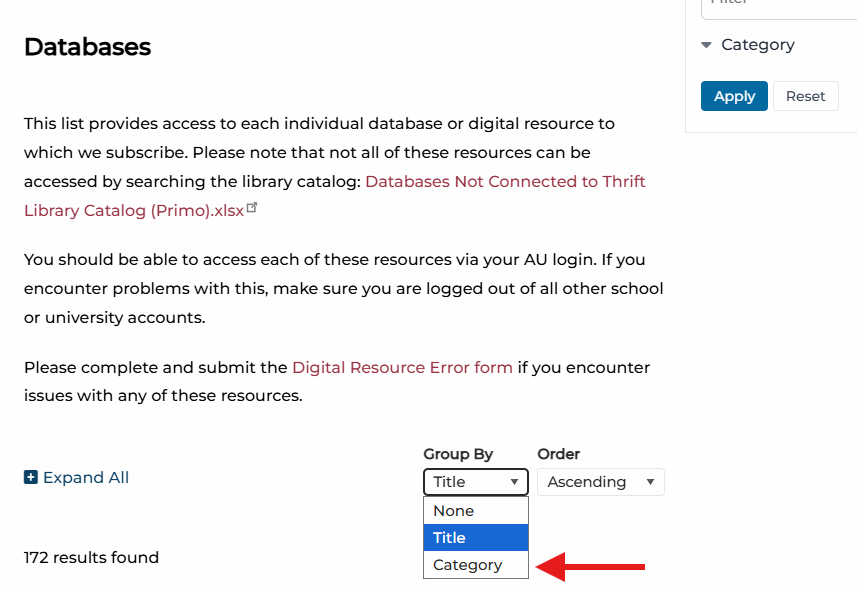
The databases tab of the Thrift Library website includes a feature that filters databases by category, so that users can find all of the databases that are grouped specifically for the course or topic that is relevant to their project. For this course, the relevant groupings would be those of "history," and "interdisciplinary," but if your research topic relates to other subjects, you may be able to find supplementary information in the related subject's grouping.

Database search features

Accessing Periodicals and Journals through the Library Catalog

Search for Articles

The Thrift Library catalog provides access to peer-reviewed, scholarly journals and trade journals in digital format via its many databases. 

Locate an Article 

Use the search box in the Thrift Library catalog to search for articles across most of the library's subscription databases.

Not all databases are integrated with our catalog. Searching individual databases will help you cast a wider net. 

On the search results page, look under "Refine my results" on the left side.

Select "Peer-Reviewed Journals" and "Articles.

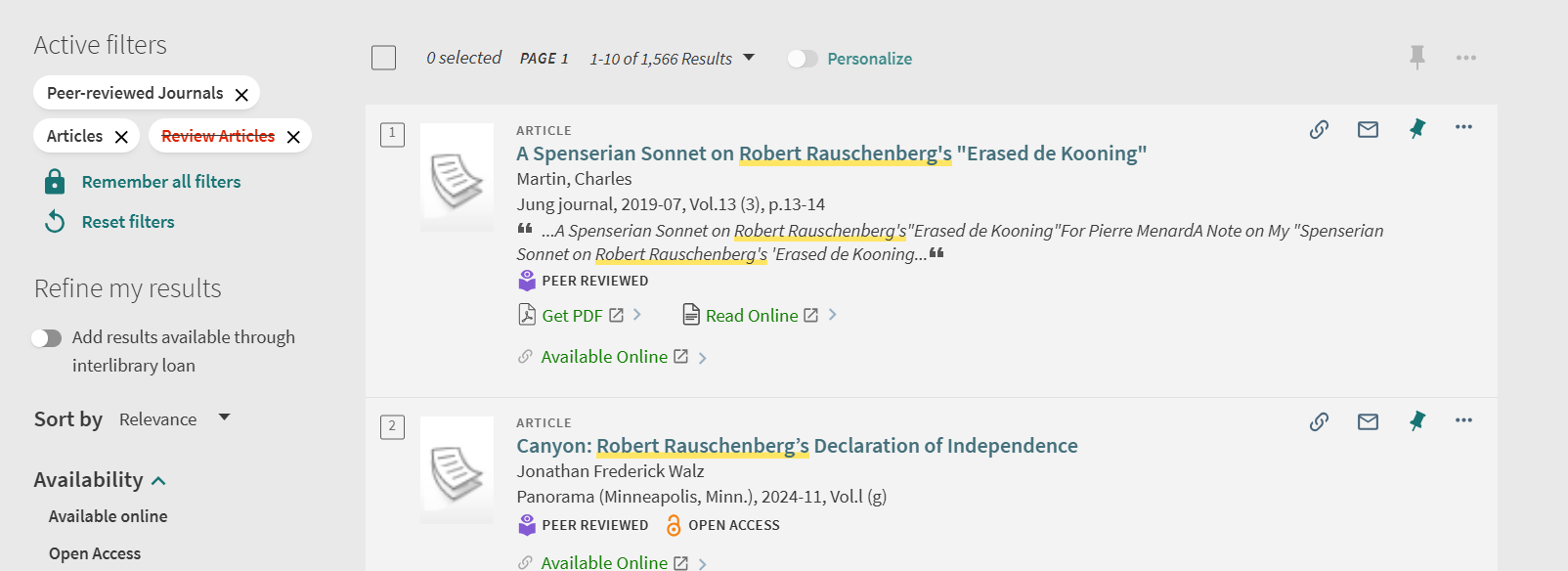
To exclude other options, select the red box beside a filter, such as the one for "Review Articles" so that your results are limited to the type of article you want.

An example screenshot with these filters on would be this: 
 Image of Thrift Library catalog search features

Once you locate an item, open its record and scroll to the "View Online" section to see which database(s) provide access to it.

 Note that databases provide two types of search results:
          1. Actual sources, which include the full-text article.
          2. Surrogate records, which only provide the article's metadata such as the author's name, article and journal titles, publication information, and an abstract and/or summary. 

If the catalog record does provide access to the full-text of the article, follow the PASCAL Delivers instructions to request that it be emailed to you through interlibrary loan (ILL).

Select a database to access the article from the available options. If it provides full text, there should be an option to view/download a PDF. 


Chicago (Turabian) Style

Chicago Style (or Turabian) is most often used in the humanities, particularly in fields like history, art, and literature. While it offers two formats, footnotes/endnotes and parenthetical in-text citations, you will most often see footnotes and endnotes being used with a Bibliography. 

What is the difference between Chicago and Turabian? Virtually nothing. The Chicago Manual of Style is the name of the style guide for use by professionals while Turabian is a simplified guide for use by students. They use the same citational style and people often refer to them interchangeably. 

For an overview on citations, including the resources listed below, visit LibraryDIY

Chicago/Turabian Citation Examples

These are examples of Chicago-Turabian citations in the Note-Bibliography style. More helpful examples can be found at https://libguides.holycross.edu/Trafton100#s-lg-box-31773256 who helped create these as well. 

Book with a single author or editor 

Footnote: Susan Walker, ed., Ancient Faces: Mummy Portraits from Roman Egypt (New York: Routledge, 2000), 10. 

Bibliography: Walker, Susan, ed. Ancient Faces: Mummy Portraits from Roman Egypt. New York: Routledge, 2000. 

Journal article from an online database

Footnote: Dominic Montserrat, "The Representation of Young Males in 'Fayum Portraits,'" The Journal of Egyptian Archaeology, 79 (1993): 220, https://doi.org/10.2307/3822166.

Bibliography: Montserrat, Dominic. "The Representation of Young Males in 'Fayum Portraits.'" The Journal of Egyptian Archaeology, 79 (1993): 215-25. https://doi.org/10.2307/3822166.

Newspaper article from an online database

Footnote: Alan Riding, "Under the Probing Gaze of the Egyptian Dead," New York Times, April 26,1997, ProQuest New York Times Historical.

Bibliography: Riding, Alan. "Under the Probing Gaze of the Egyptian Dead." New York Times, April 26, 1997. ProQuest New York Times Historical.

Page from a website

Footnote: Rachel Sabino, "Gilding the Dead: Mummy Portraits in Roman Egypt," Art Institute Chicago, last modified October 23, 2019, https://www.artic.edu/articles/767/gilding-the-dead-mummy-portraits-in-roman-egypt.

Bibliography: Sabino, Rachel. "Gilding the Dead: Mummy Portraits in Roman Egypt." Art Institute Chicago. Last modified October 23, 2019. https://www.artic.edu/articles/767/gilding-the-dead-mummy-portraits-in-roman-egypt.


Reference Management

Thrift Library recommends using Zotero for reference management.

Once you save an article, book, webpage, etc. to Zotero it will generate citations in the style guide of your choice. It also does so much more! With Zotero, you can...

  • Save PDFs and Snapshots of your sources to folders in your library
  • Annotate PDFs (when you copy and paste text from an annotated file it will automatically add quotation marks and the author, date, and page number in a parenthetical citation.)
  • Search your entire library
  • Generate bibliographies 

Zotero is a desktop app that also has a web library for when you need to access your library away from your primary computer. 

Zotero also offers browser connectors that enables users to save sources with a single click. 

More information about reference management as well as other available tools can be found in LibraryDIY under Citation Tools.