This guide is your starting point for exploring key resources, tools, and strategies for research in the field of art history. Whether you’re studying ancient architecture, medieval manuscripts, or contemporary visual culture, you'll find curated links to books, scholarly articles, image databases, and more. Be sure to explore the “Library DIY” resource, available on the Thrift Library website, which offers step-by-step help for navigating the research process independently.
Art History
Welcome
Practice Research Skills!
The Reference & Instruction team at Thrift Library have designed a series of Scavenger Hunts to help you practice your skills finding information and using your research skills. These Scavenger Hunts will provide you with five terms to search in Google in order to determine a mystery artwork! Then, you will have the opportunities to further research that person in order to practice more with the library's resources.
Choose any of the following links to participate!
Local Arts Centers, Galleries, and Museums to Visit
- Anderson Arts Center
- Art Gallery on Pendleton Square
- Art & Light Gallery (Greenville)
- Clemson Visual Arts: Lee Gallery
- Columbia Museum of Art
- Georgia Museum of Art
- Grand Bohemian Gallery (Greenville)
- Greenville County Museum of Art
- Morris Museum of Art (Augusta)
- Museum & Gallery at Bob Jones University
- Pickens County Museum of Art & History
- Spartanburg Art Museum
American Art History Museum Collections
International Art Museums and Galleries
- Art Gallery of New South Wales -Sydney, Australia
- The Art Gallery of South Australia -Adelaide, Australia
- The Art Gallery of Western Australia/AGWA -Perth, Australia
- Art Institute of Chicago -Chicago, USA
- British Museum -London, UK
- Le Gallerie Degli Uffizi (The Uffizi Galleries) -Florence, Italy
- The Getty -Los Angeles, USA
- Indian Museum Kolkata -Kolkata, India
- Instituto Inhotim (Inhotim Institute) -Brumadinho, Brazil
- Johannesburg Art Gallery -Johannesburg, South Africa
- Kunsthistorisches Museum - Vienna, Austria
- The Louvre -Paris, France
- Metropolitan Museum of Art -New York City, USA
- Mori Art Museum -Tokyo, Japan
- Museum of Modern Art/MoMA -New York City, USA
- Musée d'Orsay (Orsay Museum) -Paris, France
- Museo de Arte Latinoamericano de Buenos Aires Malba (Museum of Latin American Art of Buenos Aires) -Buenos Aires, Argentina
- Museo del Prado (Prado Museum) -Madrid, Spain
- Museo Nacional de Arte/MUNAL (National Museum of Art) - Mexico City, Mexico
- Museo Nacional de Arte Decorativo (National Museum of Decorative Art) -Buenos Aires, Argentina
- Museo Nacional de Bellas Artes (National Museum of Fine Arts) -Buenos Aires, Argentina
- Museu de Arte de São Paulo/MASP (Museum of Art of São Paulo) -São Paulo, Brazil
- Mvsei Vaticani (Vatican Museum) -Vatican City
- The National Gallery -London, UK
- National Gallery of Australia -Parkes, Australia
- National Gallery of Victoria -Melbourne, Australia
- National Museum of China -Beijing, China
- National Palace Museum -Taipei, Taiwan
- Pinacoteca de São Paulo (Art Gallery of São Paulo) - São Paulo, Brazil
- Rijksmuseum (National Museum) -Amsterdam, Netherlands
- Tehran Museum of Contemporary Art/TMOCA -Tehran, Iran
- Tokyo National Museum -Tokyo, Japan
- Zeitz Museum of Contermporary Art Africa/Zeitz MOCAA -Cape Town, South Africa
Open Access Internet Resources for Art
Art & History Databases
- ABC-CLIO E-Books
- 150 e-books on all topics.
- Academic Search Ultimate
- Full-text journal articles in social sciences, humanities, multicultural studies, education, and more. (EBSCO)
- African-American History
- Explore 500 years of African-American History and Culture. (Infobase)
- American Antiquarian Society (AAS) Historical Periodicals Collection
- Digitized images of the pages of American magazines and journals, documenting the life of America's people from the Colonial Era through the Civil War and Reconstruction-- 1684 to 1912. Includes 8,000 titles. (EBSCO)
- Associates Programs Source
- More than 2,200 full-text journals, as well as 350 full-text books. (EBSCO)
- Audiobooks EBSCOhost
- EBSCO offers a premium collection of high-quality audiobook titles, giving users 24/7 access to audiobooks that can be downloaded via Android or Apple devices. Click "Search" to see available titles.
- Biography
- Nearly a million biographical entries spanning throughout history and geography. (Gale In Context)
- Britannica
- Academic Online Edition
- A comprehensive reference resource used to access Encyclopedia Britannica plus Merriam-Webster's Collegiate Dictionary and Thesaurus, magazines and periodicals, and many other research tools. This is a great place to find the introductory materials needed to begin a research project.
- Library Reference Center
- A reference resource that includes access to Britannica Reference Center for older students and adults.
- Academic Online Edition
- Cambridge Core
- Contains hundreds of scholarly e-books, but is particularly strong in the humanities and social sciences. Users can limit their searches to library-owned content or use the platform as an index to identify materials available through interlibrary loan. (Cambridge University Press)
- Credo Reference
- A comprehensive reference resource that includes images, audio files, videos, and more than 600 full-text reference books on most major subject areas. (Infobase)
- Directory of Open Access Journals (DOAJ)
- This database contains the full test of almost 2,000 open access scientific and scholarly journals on all topics.
- Duke E-Books Scholarly Collection
- A site for reading, searching, and sharing over 3,000 Duke University Press books online, that is particularly strong in the humanities and social sciences.
- E-Book Central
- This resource hosts 250,000 titles on various topics. Search across the complete word-by-word content of every book. Copy and paste, email, cite, take notes, or share your research within ProQuest E-Book Central.
- Gale E-Books
- Gale E-Books (formerly GVRL) contains over 3,500 volumes of encyclopedias and specialized reference sources for multidisciplinary research.
- E-Books on EBSCOhost
- Around 200,000 e-books on all topics.
- Films on Demand
- A web-based digital video delivery that offers 40,000 high quality videos and multimedia academic content.
- History Reference eBook Collection
- History Reference Source
- Features 1,990 full-text reference books designed for secondary schools, public libraries, and undergraduate research plus full text to 150 history periodicals. Further, the database contains nearly 57,000 historical documents, more than 77,000 biographies of historical figures, more than 37,400 historical photos and maps, and more than 80 hours of historical vidoe. (EBSCO)
- IGI Global
- IGI Global disseminates vetted quality content within 11 core subject areas, including business and management; computer science and information technology; education; environment and agriculture; government and law; library and information science; media and communications; medicine and healthcare; science and engineering; security and forensics; as well as social sciences and the humanities.
- Jewish Studies Source
- Covers hundred of full text periodicals on Jewish Studies, including 1,600 biographies. (EBSCO)
- JSTOR
- JSTOR is a digital library of journals, academic ebooks, images, and primary sources. As of July 2024, includes Artstor: More than 2.5 million digital images - painting, sculpture, photographs, buildings, decorative arts, fashion, landscape, graphic design, architectural drawings, manuscripts, floor plans, and much more.
- Libby
- Access a wide range of both academic and recreational e-books and audiobooks purchased by Anderson University and other PASCAL institutions.
- Liebert Online
- Fifty-five authoritative journals, all full-text searchable and linked to external bibliographic databases. Topics include: medicine, engineering/informatics, law, psychology, and public health/policy.
- MasterFILE Premier
- MasterFILE Premier contains full text for general reference magazines and publications covering a wide range of subject areas including: business, health, education, general science, and multicultural issues. It also includes an extensive image collection of more than 2 million photos, maps, and flags. (EBSCO)
- Oxford English Dictionary (OED)
- The historical English dictionary: an unsurpassed guide for researchers in any discipline to the meaning, history, and usage of over 500,000 words and phrases across the English-speaking world. The OED is widely regarded as the accepted authority on the English language.
- Open Access Theses and Dissertations
- Advanced research and scholarship. Theses and dissertations, free to find, free to use.
- Open Dissertations/American Doctoral Dissertations
- Open access dissertations and theses from 1955 to present. (EBSCO)
- Primary Search Reference E-Book Collection
- Project MUSE
- Project MUSE is a leading provider of digital humanities and social sciences content. All book content on MUSE is presented DRM-free chapter-level PDFs, with unlimited simultaneous usage, unlimited downloading, and unlimited printing.
- SAGE
- Journals
- Search and browse more than a thousand journals across a range of disciplines.
- Knowledge
- An e-book platform for topics across the social sciences
- Research Methods
- Supports research at all levels by providing material and tools to guide users through every step of the research process. Provides access to e-books, datasets, podcasts, and video. Available tools include a project planner, methods map, and stats test.
- Journals
- Salem E-Books
- Over 400 reference books on careers, health, history, literature, and science.
- Science Reference E-Book Collection
- Taylor & Francis E-Books
- A collection of e-books on all topics. Users have access only to unlocked titles, as indicated by the lock icon.
- TOPICsearch
- Contains full text of over 140,000 articles from nearly 260 diverse sources including international newspapers, periodicals, biographies, public opinion polls, book reviews, pamphlets, and government information. (EBSCO)
Collected Resources


Museum Exhibition Catalog Collections
The following links will provide several museums' collections of exhibition catalogs. If you are able to find some on these websites but they are not available in the library catalog, contact [email protected] and ask if the library staff can provide access to your preferred material!
Accessing a Physical Book
Thrift Library is home to over 70,000 books. They can be very helpful when researching and working on projects. But how do you access them? Here is simple guide showing the two main ways of finding a physical book.
Step 1: Search for the book
Begin by looking in the Thrift Library catalog. You can then narrow your search from the results page. This video gives you a quick tutorial:
Simple Search:
You can do a simple search by entering the book title and/or the author into the search box. If you want to find books on your topic, enter 1-3 keywords that describe your topic. Keyword examples: ancient Greek vases; Vincent van Gogh; sculpting in the 19th century; Chinese wall hangings.
Advanced Search:
For more precise searching use the Advanced Search. Click "Advanced Search" to the right of the search box. Fill out the boxes to limit to specified fields like Title or Author.
Physical Items:
From the search results page you can limit your results to physical books held by Thrift Library. Look to the left side of the page under "Refine my results" and select the following options:
Under Resource Type, select Books
Under Availability, select Held by library
Step 2: Locating the book
Once you have identified the book you wish to use, note the call number (example: LC3731.F45 2002) and navigate to the stacks (shelves) on the second floor of the library. There is signage there to direct you in finding the items according to its call number.
Library of Congress Classification System
A call number is like an address for a book. It tells you exactly where to go to find the book on the shelf. The call number is made up of letters, whole numbers, decimals, a publication date, and occasionally a volume and/or copy number. This allows for each book to have a specific location. One book's location cannot be confused with another book's location.
Thrift Library uses the Library of Congress Classification System; here is an example: LA 212 .R423 2005.
LA specifies the subject classification (L for Education and A for History, so History of Education).
212 is read as a whole number.
The next line, .R423, is called the Cutter number. This line is read as a decimal (.R423 would come after .R76).
2005 is the publication date.
Step 3: Checkout
Once you have acquired your book, you are free to peruse it at your leisure. If you have finished using it while you are here, return it to the desk. If you want to take it with you, you can check it out. All you have to do for that is to come to the front desk with your student ID, which serves as your library card. Someone should be there to assist you. They will then check out the book and let you know about the due date for return, and you can check that by signing into the catalog at any time after checking out!
PASCAL and Interlibrary Loan
If Thrift does not have something you are looking for, you can request it from other libraries!
PASCAL Delivers
PASCAL Delivers is a FREE, rapid delivery interlibrary loan (ILL) service for print books and digitized copies of journal articles and book chapters.
- Use the catalog as you normally would (i.e. the above instructions.) after signing in using your AU credentials.
- If you cannot find the item(s), enable "Add results available through interlibrary loan" under the "Refine my results" menu on the left side of the page:
- Click on the title of the item you would like to request and click the appropriate button to open the PASCAL Delivers Request Form. Make sure that the bibliographic data you provide in the form is complete and accurate.
- Physical books will arrive at the PASCAL library location you selected within 2-14 days. You will receive an email when your items are ready for pickup. Digital items will be emailed directly to your AU email account, typically within 1-5 days.
ILL Request Options
All loaning systems in addition to PASCAL can be found here.
For any questions about these services, you can contact [email protected].
Reading LOC Call Numbers
- Visit the second floor of Thrift Library, where you'll find the stacks!
- Look at the first letter(s). Books are arranged in alphabetical order.
- N comes before P
- PL comes before PN
- Browse the signs on the end of the bookshelves to find your section
- When you find the correct shelving area, scan over the numbers on the spine label (102 is one hundred two, not 1-0-2).
- After that number, search alphabetically from the other letter after the decimal.
- Some copies are arranged by publication date as well, the year will appear at the end of the call number.
Example
NB 1115 .A32 2020
NB is the section to search for, in alphabetical order between NA and NC.
1115 is the numbers before the decimal in numerical order on the shelf.
A32 after the decimal will be in alphabetical and then numerical order.
2020 is the publication year. If another edition of the same book was published in 2018, the two copies will be right next to each other with 2018 appearing first because they are shelved in chronological order.
Accessing E-Books and articles
Begin by looking in the Thrift Library catalog. You can then narrow your search from the results page.
This video gives you a quick tutorial:
Simple Search
You can do a simple search by entering the book title and/or the author into the search box. If you want to find books on your topic, enter 1-3 keywords that describe your topic.
Keyword examples: ancient Greek vases; Vincent van Gogh; sculpting in the 19th century; Chinese wall hangings.
Advanced Search
For more precise searching use the Advanced Search.
Click "Advanced Search" to the right of the search box.
Fill out the boxes to limit to specified fields like "Title" or "Author."
Limit Search Results to E-Books
From the search results page you can limit your results to electronic (digital) books held by Thrift Library.
Look to the left side of the page under "Refine my results" and select the following options:
- Under "Resource Type," select "Books"
- Under "Availability," select "Available online"
Articles and Journals
From the search results page you can also look at physical items, articles, or essays written on the topic of your choice.
Use "Refine my results" to hone in on these as well by selecting things like Peer-Reviewed Journals and Articles.
Accessing Periodicals and Journals through the Library Catalog
Search for Articles
The Thrift Library catalog provides access to peer-reviewed, scholarly journals and trade journals in digital format via its many databases.
Locate an Article
After logging into the catalog using your AU credentials, use the search box in the Thrift Library catalog to search for articles across most of the library's subscription databases.
Not all databases are integrated with our catalog. Searching individual databases will help you cast a wider net.
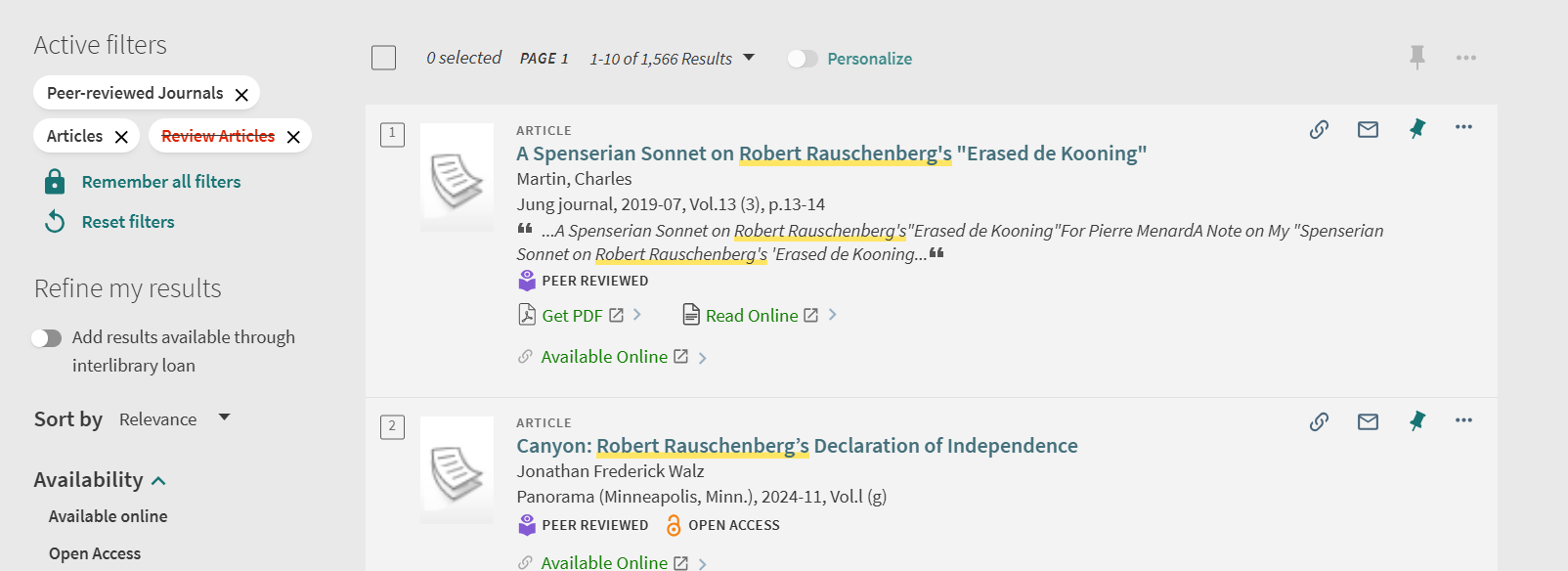
On the search results page, look under "Refine my results" on the left side.
Select "Peer-Reviewed Journals" and "Articles."
To exclude other options, select the red box beside a filter, such as the one for "Review Articles" so that your results are limited to the type of article you want.
An example screenshot with these filters on would be this:
Once you locate an item, open its record and scroll to the "View Online" section to see which database(s) provide access to it.
Note that databases provide two types of search results:
1. Actual sources, which include the full-text article.
2. Surrogate records, which only provide the article's metadata such as the author's name, article and journal titles, publication information, and an abstract and/or summary.
If the catalog record does provide access to the full-text of the article, follow the PASCAL Delivers instructions to request that it be emailed to you through interlibrary loan (ILL).
Select a database to access the article from the available options. If it provides full text, there should be an option to view/download a PDF.
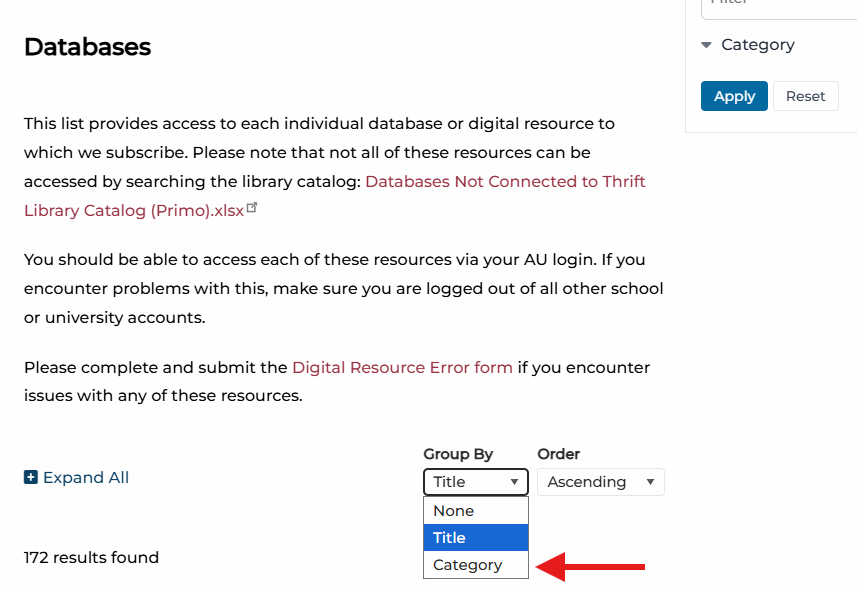
Databases from the Library
The databases tab of the Thrift Library website includes a feature that filters databases by category, so that users can find all of the databases that are grouped specifically for the course or topic that is relevant to their project. For this course, the relevant groupings would be those of "art," "history," and "interdisciplinary."
Chicago/Turabian Citation References
Helpful sites to visit for your citations:
- Library DIY Guide specific to citations and their usage in projects
- Chicago-style Citation Quick Guide
- Turabian Quick Guide
Chicago/Turabian Citation Examples
These are examples of Chicago-Turabian citations in the Note-Bibliography style. More helpful examples can be found at https://libguides.holycross.edu/Trafton100#s-lg-box-31773256 who helped create these as well.
Book with a single author or editor
Footnote: Susan Walker, ed., Ancient Faces: Mummy Portraits from Roman Egypt (New York: Routledge, 2000), 10.
Bibliography: Walker, Susan, ed. Ancient Faces: Mummy Portraits from Roman Egypt. New York: Routledge, 2000.
Journal article from an online database
Footnote: Dominic Montserrat, "The Representation of Young Males in 'Fayum Portraits,'" The Journal of Egyptian Archaeology, 79 (1993): 220, https://doi.org/10.2307/3822166.
Bibliography: Montserrat, Dominic. "The Representation of Young Males in 'Fayum Portraits.'" The Journal of Egyptian Archaeology, 79 (1993): 215-25. https://doi.org/10.2307/3822166.
Newspaper article from an online database
Footnote: Alan Riding, "Under the Probing Gaze of the Egyptian Dead," New York Times, April 26,1997, ProQuest New York Times Historical.
Bibliography: Riding, Alan. "Under the Probing Gaze of the Egyptian Dead." New York Times, April 26, 1997. ProQuest New York Times Historical.
Page from a website
Footnote: Rachel Sabino, "Gilding the Dead: Mummy Portraits in Roman Egypt," Art Institute Chicago, last modified October 23, 2019, https://www.artic.edu/articles/767/gilding-the-dead-mummy-portraits-in-roman-egypt.
Bibliography: Sabino, Rachel. "Gilding the Dead: Mummy Portraits in Roman Egypt." Art Institute Chicago. Last modified October 23, 2019. https://www.artic.edu/articles/767/gilding-the-dead-mummy-portraits-in-roman-egypt.
Reference Management
Thrift Library recommends using Zotero for reference management.
Once you save an article, book, webpage, etc. to Zotero it will generate citations in the style guide of your choice. It also does so much more! With Zotero, you can...
- Save PDFs and Snapshots of your sources to folders in your library
- Annotate PDFs (when you copy and paste text from an annotated file it will automatically add quotation marks and the author, date, and page number in a parenthetical citation.)
- Search your entire library
- Generate bibliographies
Zotero is a desktop app that also has a web library for when you need to access your library away from your primary computer.
Zotero also offers browser connectors that enables users to save sources with a single click.
More information about reference management as well as other available tools can be found in LibraryDIY under Citation Tools.