CTI 499: Art, Theft, and Money

Introduction: CTI 499

This course will examine current newsworthy examples of art ownership, display, and sales.  The purpose of this course is to better understand the social, political, and economic power of art in our time. Topics may include high-priced sales, thefts and forgeries, government support of the arts, controversies over ownership, influential museum exhibitions, advertising campaigns, and the soft political power of art.

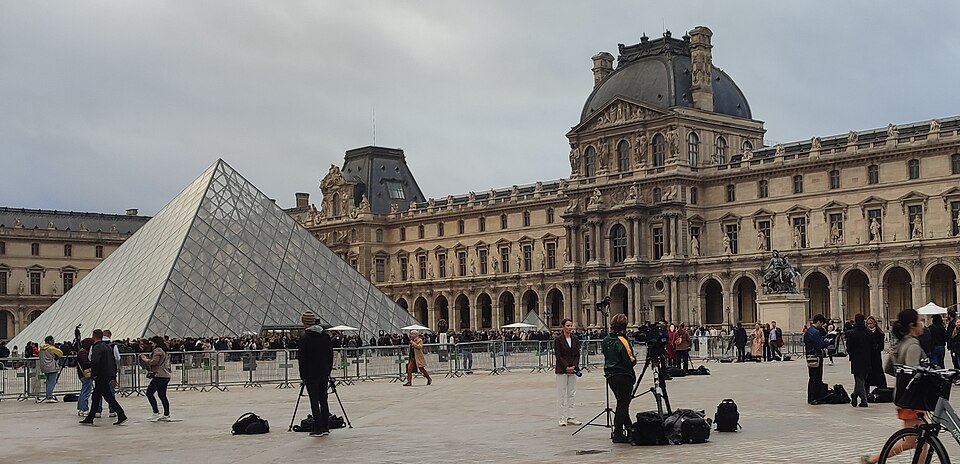
File:Journalists at the Louvre after the 2025 Robbery 04 (flatter cropped).jpg

Journalists at the Louvre after the 2025 Robbery.

Encyclopedia Sources

  • Art Institute of Chicago
    • For nearly one hundred years, the Publishing department of the Art Institute of Chicago has produced high-quality, impactful, and accessible publications that contribute to knowledge and engage readers of all kinds, empowering them to make meaningful connections with art and art history. Explore our range of print and digital titles, from popular collection publications to scholarly exhibition catalogues.
  • Britannica
    • An open-access encyclopedia on a wide range of topics. Often considered one of the leading reference sources for the broadest range of subjecs.
  • Conservation & Art Materials Encyclopedia Online (CAMEO)
    • The Conservation and Art Materials Encyclopedia Online is a database that compiles, defines, and disseminates technical information on the distinct collection of terms, materials, and techniques used in the fields of art conservation and historic preservation. First developed as a materials database in 1997 at the Museum of Fine Arts, Boston, it has expanded with the cooperation of multiple institutions to include several reference collections.
  • The Metropolitan Museum of Art (MET)
    • Expore more than 1,000 essays on a wide range of topics, including artists, materials, movements, and themes curated by the Metropolitan Museum of Art.
  • The Museum of Modern Art (MoMA)
    • This is a list of artists with work in the Musuem of Modern Art's collection or who have been included in a MoMA exhibition. It is updated continually. 
  • Oxford Art Online
    • The gateway to Oxford's art reference works, including the peer-reviewed, regularly updated Grove Dictionary of Art and the Benezit Dictionary of Artists. Includes over 200,000 articles that span ancient to contemporary art and architecutre, as well as over 19,000 images of works of art, structures, plans, and artists signatures. Some of these materials are not available, but all searches may be filtered using the criteria to the left of the screen by what is free and unlocked.
  • Smarthistory
    • Art from every continent, prehistoric to today-- interpreted by leading scholars. With more than 850 contributing scholars and recommended by more than 600 universities, museums, and libraries, Smarthistory is trusted by millions around the world.
  • The Getty Research Institute
    • The Getty Research Institute was established in 1983 as part of the J. Paul Getty Trust, with a mission to support advanced research in the history of art and the humanities. Originally known as the Getty Center for the History of Art and the Humanities, it has evolved into a leading international center for scholarship, library collections, and public programs. Over the decades, the Research Institute has expanded its initiatives to foster global collaboration, preserve cultural heritage, and provide access to rare and specialized resources for researchers worldwide.

Accessing Periodicals and Journals through the Library Catalog

Search for Articles

The Thrift Library catalog provides access to peer-reviewed, scholarly journals and trade journals in digital format via its many databases. 

Locate an Article 

Use the search box in the Thrift Library catalog to search for articles across most of the library's subscription databases.

Not all databases are integrated with our catalog. Searching individual databases will help you cast a wider net. 

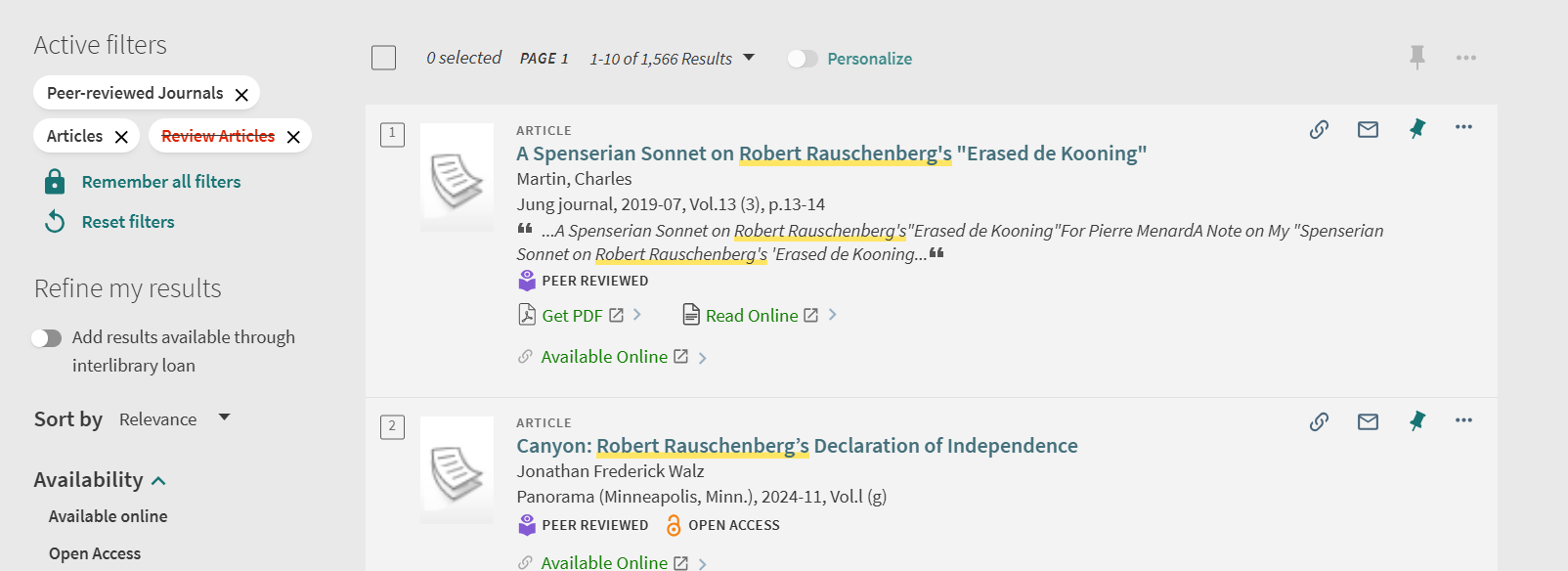
On the search results page, look under "Refine my results" on the left side.

Select "Peer-Reviewed Journals" and "Articles.

To exclude other options, select the red box beside a filter, such as the one for "Review Articles" so that your results are limited to the type of article you want.

An example screenshot with these filters on would be this: 
 Image of Thrift Library catalog search features

Once you locate an item, open its record and scroll to the "View Online" section to see which database(s) provide access to it.

 Note that databases provide two types of search results:
          1. Actual sources, which include the full-text article.
          2. Surrogate records, which only provide the article's metadata such as the author's name, article and journal titles, publication information, and an abstract and/or summary. 

If the catalog record does provide access to the full-text of the article, follow the PASCAL Delivers instructions to request that it be emailed to you through interlibrary loan (ILL).

Select a database to access the article from the available options. If it provides full text, there should be an option to view/download a PDF. 


Media Bias

View the interactive Media Bias Chart to evaluate the credibility of various news sources in your research!


Accessing a Physical Book

Thrift Library is home to over 70,000 books. They can be very helpful when researching and working on projects. But how do you access them? Here is simple guide showing the two main ways of finding a physical book. 

Step 1: Search for the book

Begin by looking in the Thrift Library catalog. You can then narrow your search from the results page. This video gives you a quick tutorial:

Simple Search:
You can do a simple search by entering the book title and/or the author into the search box. If you want to find books on your topic, enter 1-3 keywords that describe your topic. Keyword examples: ancient Greek vases; Vincent van Gogh; sculpting in the 19th century; Chinese wall hangings. 

Advanced Search:
For more precise searching use the Advanced Search. Click "Advanced Search" to the right of the search box. Fill out the boxes to limit to specified fields like Title or Author. 

Physical Items:
From the search results page you can limit your results to physical books held by Thrift Library. Look to the left side of the page under "Refine my results" and select the following options:
Under Resource Type, select Books
Under Availability, select Held by library

Step 2: Locating the book

Once you have identified the book you wish to use, note the call number (example: LC3731.F45 2002) and navigate to the stacks (shelves) on the second floor of the library. There is signage there to direct you in finding the items according to its call number.

Library of Congress Classification System
A call number is like an address for a book. It tells you exactly where to go to find the book on the shelf. The call number is made up of letters, whole numbers, decimals, a publication date, and occasionally a volume and/or copy number. This allows for each book to have a specific location. One book's location cannot be confused with another book's location. 

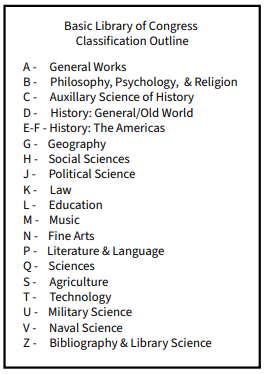
Thrift Library uses the Library of Congress Classification System; here is an example: LA 212 .R423 2005
LA specifies the subject classification (L for Education and A for History, so History of Education).  
212 is read as a whole number. 
The next line, .R423, is called the Cutter number. This line is read as a decimal (.R423 would come after .R76). 
2005 is the publication date.  

Step 3: Checkout

Once you have acquired your book, you are free to peruse it at your leisure. If you have finished using it while you are here, return it to the desk. If you want to take it with you, you can check it out. All you have to do for that is to come to the front desk with your student ID, which serves as your library card. Someone should be there to assist you. They will then check out the book and let you know about the due date for return, and  you can check that by signing into the catalog at any time after checking out!

Art Book Locations

The Library of Congress system classifies Art as the subject N. Check the end caps of the bookshelves for further details as they will list the call number range for each shelf.

Library of Congress Class Divisions


Due to the more unique nature of many artbooks, they might also be classified as Oversized (too big for the usual shelves). So one should also check the Oversized book section-- look for the large geode!


Oversized books will be in order of A-Z for that collection. 

PASCAL and Interlibrary Loan

If Thrift does not have something you are looking for, you can request it from other libraries! 

PASCAL Delivers

PASCAL Delivers is a FREE, rapid delivery interlibrary loan (ILL) service for print books and digitized copies of journal articles and book chapters. 

  1. Use the catalog as you normally would (i.e. the above instructions.)
  2. If you cannot find the item(s), enable "Add results available through interlibrary loan" under the "Refine my results" menu on the left side of the page: 
  3. Click on the title of the item you would like to request and click the appropriate button to open the PASCAL Delivers Request Form. Make sure that the bibliographic data you provide in the form is complete and accurate. 
  4. Physical books will arrive at the PASCAL library location you selected within 2-14 days. You will receive an email when your items are ready for pickup. Digital items will be emailed directly to your AU email account, typically within 1-5 days.

ILL Request Options

All loaning systems in addition to PASCAL can be found here

For any questions about these services, you can contact reference@andersonuniversity.edu.

Reading LOC Call Numbers

  1. Visit the second floor of Thrift Library, where you'll find the stacks!
  2. Look at the first letter(s). Books are arranged in alphabetical order.
    • N comes before P
    • PL comes before PN
    • Browse the signs on the end of the bookshelves to find your section
  3. When you find the correct shelving area, scan over the numbers on the spine label (102 is one hundred two, not 1-0-2).
  4. After that number, search alphabetically from the other letter after the decimal.
  5. Some copies are arranged by publication date as well, the year will appear at the end of the call number. 

Example

NB 1115 .A32 2020

NB is the section to search for, in alphabetical order between NA and NC

1115 is the numbers before the decimal in numerical order on the shelf.

A32 after the decimal will be in alphabetical and then numerical order.

2020 is the publication year. If another edition of the same book was published in 2018, the two copies will be right next to each other with 2018 appearing first because they are shelved in chronological order.

Accessing E-Books and articles

Begin by looking in the Thrift Library catalog. You can then narrow your search from the results page.

 This video gives you a quick tutorial:

Simple Search
You can do a simple search by entering the book title and/or the author into the search box. If you want to find books on your topic, enter 1-3 keywords that describe your topic. 

Keyword examples: ancient Greek vases; Vincent van Gogh; sculpting in the 19th century; Chinese wall hangings.

Advanced Search
For more precise searching use the Advanced Search. 

Click "Advanced Search" to the right of the search box

Fill out the boxes to limit to specified fields like "Title" or "Author." 

Limit Search Results to E-Books
From the search results page you can limit your results to electronic (digital) books held by Thrift Library.

Look to the left side of the page under "Refine my results" and select the following options:

  • Under "Resource Type," select "Books"
  • Under "Availability," select "Available online"

Articles and Journals
From the search results page you can also look at physical items, articles, or essays written on the topic of your choice. 

Use "Refine my results" to hone in on these as well by selecting things like Peer-Reviewed Journals and Articles.

Open Resources

  • British Museum Publications
    • The British Museum produces a range of publications that showcase the scope and depth of research it undertakes.
  • Getty Publications Virtual Library
    • More than 300 books to read and download for free.
  • Getty Research Portal
    • A free online search platform providing worldwide access to an extensive collection of digitized art history texts from a range of institutions.
  • Guggenheim Museum Internet Archive
    • The Solomon R. Guggenheim Foundation's internet archive collection of books and catalogs documenting its exhibitions and collections.
  • MetPublications
    • Explore over 1,700 titles published by The Metropolitan Museum of Art, including books, museum guides, and periodicals from the last six decades.
  • National Gallery of Art
    • Discover beautiful exhibition publications, collection highlights, in-depth research, and more.

Chicago/Turabian Citation References

Helpful sites to visit for your citations: 

Chicago/Turabian Citation Examples

These are examples of Chicago-Turabian citations in the Note-Bibliography style. More helpful examples can be found at https://libguides.holycross.edu/Trafton100#s-lg-box-31773256 who helped create these as well. 

Book with a single author or editor 

Footnote: Susan Walker, ed., Ancient Faces: Mummy Portraits from Roman Egypt (New York: Routledge, 2000), 10. 

Bibliography: Walker, Susan, ed. Ancient Faces: Mummy Portraits from Roman Egypt. New York: Routledge, 2000. 

Journal article from an online database

Footnote: Dominic Montserrat, "The Representation of Young Males in 'Fayum Portraits,'" The Journal of Egyptian Archaeology, 79 (1993): 220, https://doi.org/10.2307/3822166.

Bibliography: Montserrat, Dominic. "The Representation of Young Males in 'Fayum Portraits.'" The Journal of Egyptian Archaeology, 79 (1993): 215-25. https://doi.org/10.2307/3822166.

Newspaper article from an online database

Footnote: Alan Riding, "Under the Probing Gaze of the Egyptian Dead," New York Times, April 26,1997, ProQuest New York Times Historical.

Bibliography: Riding, Alan. "Under the Probing Gaze of the Egyptian Dead." New York Times, April 26, 1997. ProQuest New York Times Historical.

Page from a website

Footnote: Rachel Sabino, "Gilding the Dead: Mummy Portraits in Roman Egypt," Art Institute Chicago, last modified October 23, 2019, https://www.artic.edu/articles/767/gilding-the-dead-mummy-portraits-in-roman-egypt.

Bibliography: Sabino, Rachel. "Gilding the Dead: Mummy Portraits in Roman Egypt." Art Institute Chicago. Last modified October 23, 2019. https://www.artic.edu/articles/767/gilding-the-dead-mummy-portraits-in-roman-egypt.


Reference Management

Thrift Library recommends using Zotero for reference management.

Once you save an article, book, webpage, etc. to Zotero it will generate citations in the style guide of your choice. It also does so much more! With Zotero, you can...

  • Save PDFs and Snapshots of your sources to folders in your library
  • Annotate PDFs (when you copy and paste text from an annotated file it will automatically add quotation marks and the author, date, and page number in a parenthetical citation.)
  • Search your entire library
  • Generate bibliographies 

Zotero is a desktop app that also has a web library for when you need to access your library away from your primary computer. 

Zotero also offers browser connectors that enables users to save sources with a single click. 

More information about reference management as well as other available tools can be found in LibraryDIY under Citation Tools.