
English 102 students, hello from Thrift Library! Whether this is your first academic research experience or you feel like a seasoned pro already, we are here to help you elevate your work. Starting your research journey is exciting, but it can also be overwhelming. Hopefully this research guide can offer some helpful tips and ideas to support your projects.
ENG 102: Composition and Communication II
Welcome!
Introduction to LibraryDIY
Accessibly from Thrift Library's homepage, LibraryDIY is a collection of tutorials that address all aspects of undergraduate research. The Home and Help page offers a table of contents, so you can find answers to your specific questions.
Highlights include:
- How to Narrow Your Topic
- Thesis Statements
- How to Read Scholarly Materials
- Choosing & Using Keywords
- Citation Tools

Using the Catalog
The Thrift Library Catalog can be accessed from the library's Homepage by selecting the box labeled catalog. The search box provides one-stop searching for books, ebooks, articles, and more. Once signed in, users are able to renew items, request physical materials from other PASCAL libraries, and save searches.
Scroll down on the catalog's front page to view video introductions to searching with the catalog.
The catalog is a great place to start, but is still important that users conduct searches in discipline-specific databases. The catalog and individual databases will provide different sources with the same query. Additionally, there are a few databases that are not indexed in the catalog.
✨ Research Assistant -- AI powered research tool ✨
Thrift Library has a new AI-powered research tool called Research Assistant. Users can access the beta version of Research Assistant through the top menu on the library catalog.

The Research Assistant uses natural language queries -- this means that you can search using a question like you may when using search engines like Google.

After you enter your research question the Research Assistant will locate the top five most relevant scholarly sources that it has access to and provide a overview of the topic. Research Assistant is searching all of the material that it has access to, which may or may not be content that Thrift Library subscribes to.

Learn more about Research Assistant by watching the tutorial on the front page of the catalog.
Databases for Interdisciplinary Research
The following databases are strong choices for interdisciplinary research. Access these and many others on Thrift Library's website under Databases A-Z.
Tip: To view databases by discipline, use the Group By: Category function.
- Academic Search Ultimate Full-text journal articles in social sciences, humanities, multicultural studies, education, and more. (Ebsco)
- Britannica Academic Online Edition A comprehensive reference resource used to access Encyclopædia Britannica plus Merriam-Webster’s Collegiate Dictionary and Thesaurus, magazines and periodicals, and many other research tools. Great place to get the introductory material needed to start your research.
- IGI Global IGI Global disseminates vetted quality content within 11 core subject areas, including Business and Management; Computer Science and Information Technology; Education; Environment and Agriculture; Government and Law; Library and Information Science; Media and Communications; Medicine and Healthcare; Science and Engineering; Security and Forensics; and Social Sciences and Humanities.
- JSTOR JSTOR is a digital library of journals, academic ebooks, images, and primary sources. As of July 2024, includes Artstor: More than 2.5 million digital images - painting, sculpture, photographs, buildings, decorative arts, fashion, landscape, graphic design, architectural drawings, manuscripts, floor plans, and much more
Selecting Discipline-Specific Databases
To locate more specific results, you may want to search in a discipline-specific database. Ask yourself, what kind of scholar would be researching this topic?
For example, you may be researching narcissism and its impact on relationships. What kind of scholar is also researching this topic? Probably psychologists and sociologists. You may want to look through databases that index scholarly research in psychology and sociology.
You can access discipline-specific databases by filtering the Databases A-Z page. Select Group by>Category.
News Sources
The following databases are strong choices for news sources. Access these and many others on Thrift Library's website under Databases A-Z.
Tip: To view databases by discipline, use the Group By: Category function.
- News: Gale OneFile A one-stop source for the day's news and searchable archives. With InfoTrac Newsstand, you can search a collection of 2,300 national, international, state and local newspapers as well as another 1,000 other formats - magazine, newsletters, newswires, blogs, etc. (Gale OneFile)
- Newspaper Source Plus Provides the latest news from the leading national and international news sources. (Ebsco)
- Newswires Provides near real-time access to top world-wide news from the Associated Press. The collection includes AP Top News, WorldStream, Financial News, AP Online, US Politics & Government and 50 State Reports. (Ebsco)
- Regional Business News This site provides comprehensive full text articles for more than 50 regional business publications. (Ebsco)
- U. S. Newsstream A full-text news source that provides access to The New York Times, Chicago Tribune, The Wall Street Journal, Los Angeles Times, The Washington Post, CNN Newswires, and Huffington Post. Also provides access to local and regional news sources.
Scholarly and Popular Sources
As you conduct research in the library, you will come into contact with two types of credible sources: scholarly sources and popular sources. Both can be credible and trustworthy, but they serve different purposes.
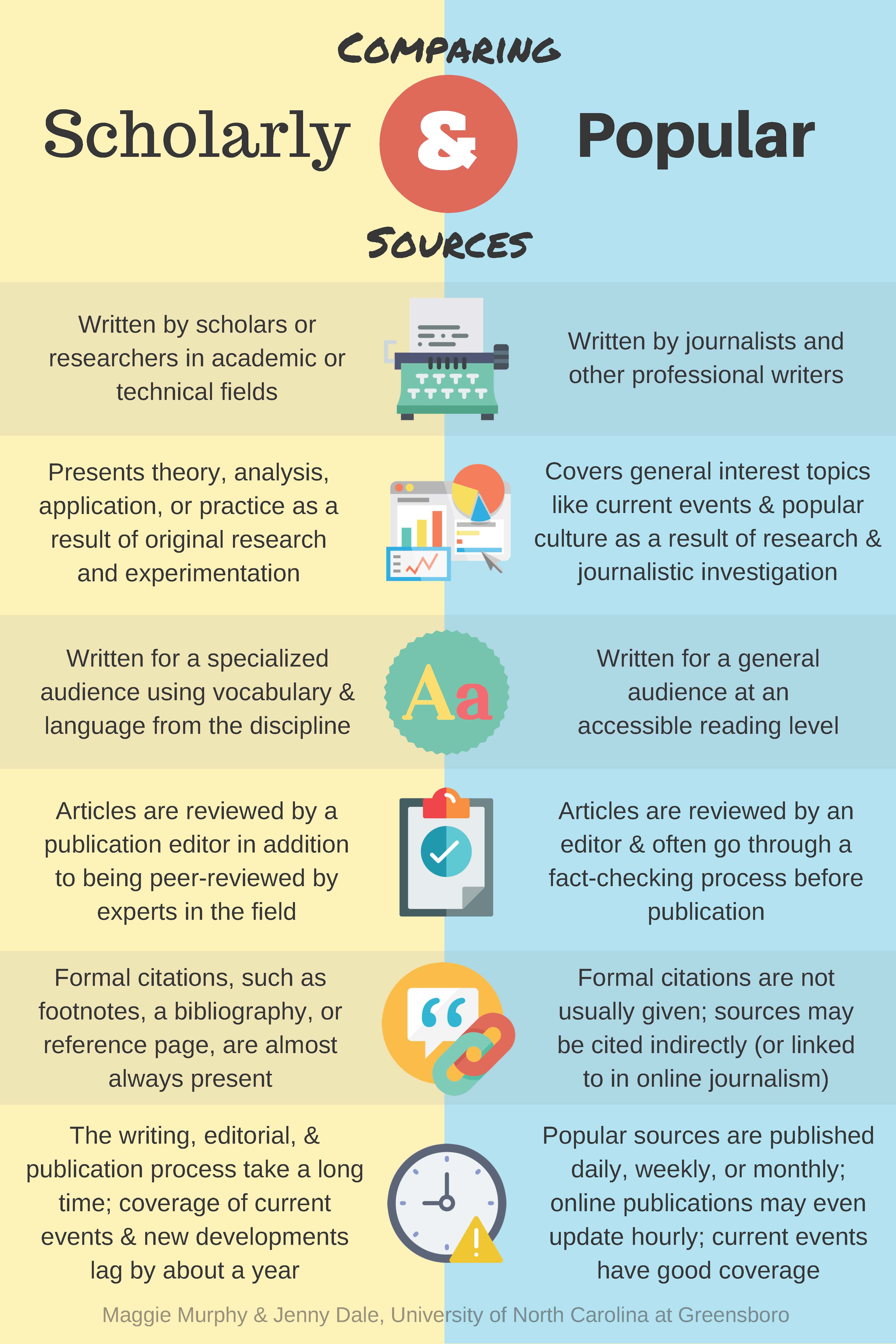
Knowing When to Use Scholarly or Popular Sources
Since scholarly and popular sources serve different purposes, it is important to know when to use one over the other.
If your professor has instructed you to use peer-reviewed sources, you should stick to scholarly sources.
However, if you need to supplement the evidence from peer-reviewed scholarly sources with information about current events, you should include references to credible popular sources. You can find credible news sources through the library's news databases (see Databases>News Sources in this research guide.)
MLA
For an overview on citations, including the resources listed below, visit LibraryDIY.
- MLA Online Handbook Access an online version of the MLA handbook.
- MLA Handbook A physical copy of the MLA handbook is available at Thrift Library.
- MLA Tutorial Anderson students have access to tutorials on information literacy topics, including an overview on citations using
Reference Management
Thrift Library recommends using Zotero for reference management.
Once you save an article, book, webpage, etc. to Zotero it will generate citations in the style guide of your choice. It also does so much more! With Zotero, you can...
- Save PDFs and Snapshots of your sources to folders in your library
- Annotate PDFs (when you copy and paste text from an annotated file it will automatically add quotation marks and the author, date, and page number in a parenthetical citation.)
- Search your entire library
- Generate bibliographies
Zotero is a desktop app that also has a web library for when you need to access your library away from your primary computer.
Zotero also offers browser connectors that enables users to save sources with a single click.
More information about reference management as well as other available tools can be found in LibraryDIY under Citation Tools.

Determining Search Terms
Most search platforms function in one of two ways: keyword searching or natural language searching. Natural language searching allows you to enter your full research question or thought in your own words; the system then translates that question into searchable keywords and conducts its search. Keyword searching requires that you remove unnecessary words and provide the keywords yourself.
Keyword searching is more prevalent in library catalogs and databases, though natural language searches are starting to make their way into these platforms through AI tools (such as the Primo Research Assistant).
Until natural language searching is widespread, it remains essential to know how to determine functional keywords for your searches.
How to turn a research question into functional keywords:
Step 1: Start with Research Question or Thesis What are the negative effects of excessive social media addiction on the mental health of today’s college students?
|
Step 2: Remove Unnecessary words
negative effects, excessive social media addiction, mental health, college students
|
Step 3: Reconsider Biased and Limiting Language
social media, mental health, college students
|
Step 4: Identify Related Terms
social media, Instagram, TikTok, social networking, online platforms, social networks, mental health, psychological health, emotional health, mental wellness, college students, undergraduates, university students, young adults, emerging adults, post-secondary students
|
Basic Search Techniques
Most library catalogs and databases default to a “basic search.” Basic searching typically yields a large number of results and is useful for early-stage research and for familiarizing yourself with the types of information available for your topic.
Keyword Searching
- Enter 2-5 keywords into the library catalog’s “Basic Search” bar.
- Results include sources that include one or all of the keywords ANYWHERE in the item record: Title, Full text, Abstract, Review, Publisher, Author, Subject, etc.
Search Filters
- Narrow or broaden your search by selecting filters from the “Tweak your results” field on the catalog menu: peer-review, date of publication, subject, type, etc.
- Most databases have a similar menu for filtering results.
Advanced Search Techniques
Subject Searching
Searching by subject is useful for later-stage research that calls for more specifically applicable resources.
Information experts from Library of Congress and other well-known institutions conduct in-depth analysis of published materials to assign “subject” classifications which are used by libraries around the globe. Subject terminology (controlled vocabulary) can be specific and technical – varying from the terms you determined for your research.
Results in the library catalog use the following controlled vocabularies:
Library of Congress Subject Headings (LCSH) – information at https://id.loc.gov/authorities/subjects.html
MeSH – information at https://www.ncbi.nlm.nih.gov/mesh/
A small subset of Proquest thesaurus terms
The simplest way to identify subjects for searching is to browse the results of a keyword search for applicable resources, then view the record’s “Subjects” list. Each subject listed is a clickable hyperlink leading to a search for all records with that subject classification.
Tip: Search for items matching more than one subject using Boolean Operators (see below) in an advanced search to pinpoint the results you need.
Boolean Operators
George Boole (1815–1864) was a pioneering English mathematician, logician, and philosopher who laid the foundation for modern symbolic logic and Boolean algebra. His work is fundamental to the logic used in search engines today – Boolean Logic.
The three main Boolean Operators used in information searching are AND, OR, and NOT. These terms are used by search engines to connect keywords and construct logical search queries that enable search engines to refine results.
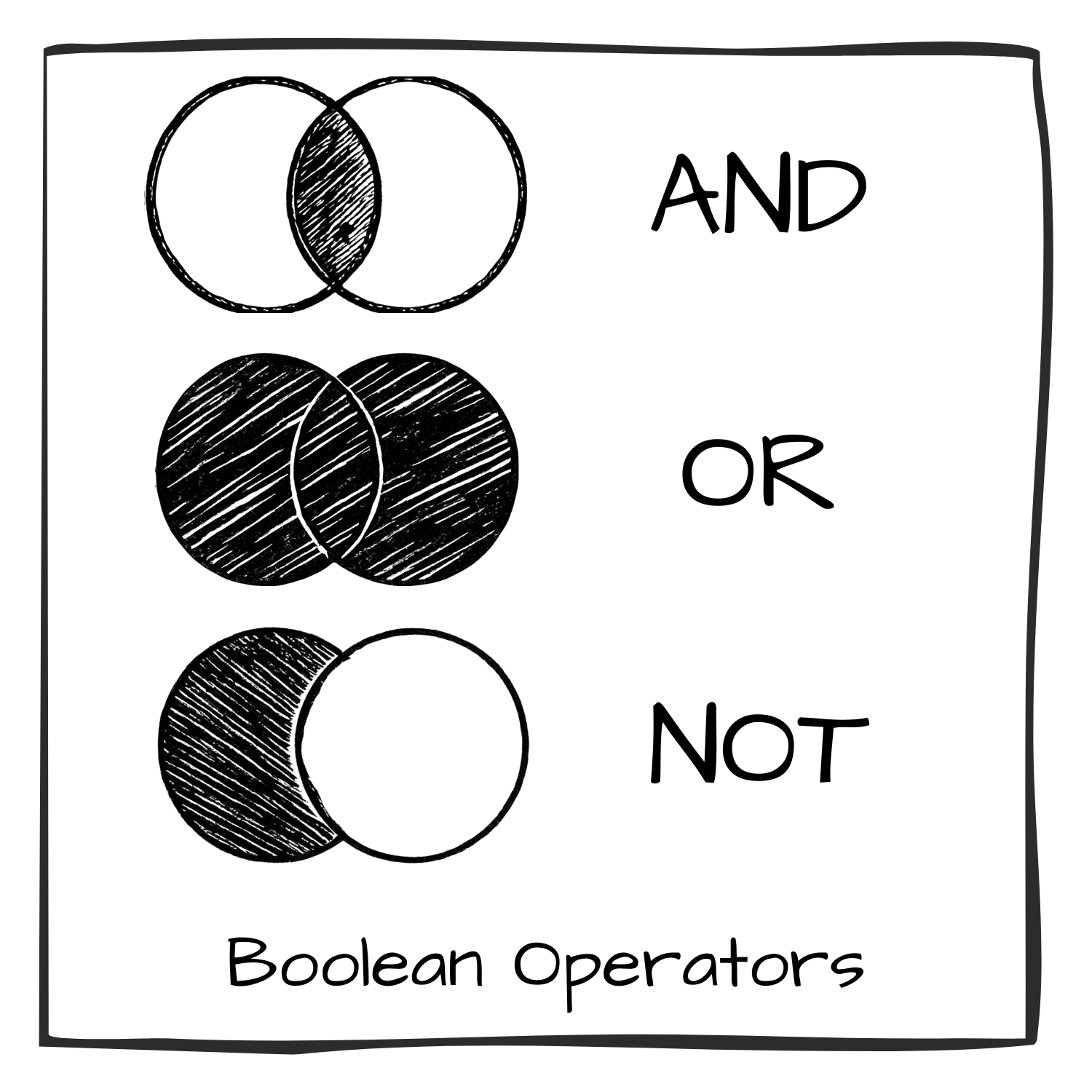
The AND operator is used to narrow results by searching for only records that contain both terms. i.e. Mathematics AND Education
The OR operator is used to broaden results by searching for records that contain at least one of the terms. i.e. Mathematics OR Education
The NOT operator is used to narrow results by searching for records that contain one result but include no mention of the other. i.e. Mathematics NOT Education.
Advanced catalog searching allows the combination of numerous terms using Boolean operators to produce extremely specific search queries. While applying Boolean operators can be very useful in narrowing your search results, it can also be extremely limiting and remove too many results for functional research. Try various combinations of terms until you find the balance of narrow and relevant results.
Note: Operators will be applied in linear order, so “Mathematics AND Education NOT University” will yield different results from “Mathematics NOT University AND Education”.
Other Techniques
Quotation Marks Placing quotation marks (“”) around multiple terms ensures that the system only searches for records in which those terms appear as a phrase, exactly as they appear within the quotation marks.
i.e. “social media algorithms”
Tip: Be sure to check your spelling when using quotation marks.
|
Truncation Truncation uses an asterisk (*) following a root word or shortened word to search for records that include various derivatives of the word.
i.e. psycholog* (psychology, psychologist, psychological, etc.)
|
Wildcard Wildcard searching utilizes an asterisk (*) within a word to indicate any number of characters or a question mark (?) to indicate a single character within a word. This is useful for locating various spellings or forms of a word.
i.e. behavi*r (behavior, behaviour), wom*n (women, woman)
|
The TRAAP Method
The TRAAP method is a systematic approach to assessing source quality which helps you move beyond surface-level judgements and did deeper into the appropriateness of a source in the context of your unique research needs:
TRAAP stands for:
Timeliness – Relevance – Authority – Accuracy – Purpose
Timeliness
Note: Currency requirements vary by discipline. Scientific and medical research typically requires recent sources (within 5-10 years) while historical analysis, literary criticism, or theological studies may rely more on foundational works from decades or centuries past. Perhaps your research calls for a combination of both.
|
Relevance
Consider: A source can be highly credible, but still inappropriate for your research. Each source must be relevant to your specific argument or research focus so that readers can clearly see why you’ve chosen to include it.
|
Authority
Remember: Authority looks different across contexts. Academic credentials matter for scholarly research, but professional experience, lived experience, or specialized training may be equally or more valuable depending on your topic. |
Accuracy
Tip: Cross-reference claims with multiple reputable sources. Even peer-reviewed articles can contain errors or be later retracted.
|
Purpose
Important: All authors (yourself included) are biased. The goal isn’t to find completely neutral sources, but to recognize bias and account for it in your analysis.
|
TRAAP Teacher - https://box.boodle.ai/a/@TRAAPTeacher
This AI tool walks you through using the TRAAP method for evaluating an article for use in an academic paper. Using a provided source and research context, you'll be prompted to complete each step of the analysis. The bot will complete its own assessment and compare its findings to yours.