MCAT Study Materials

MCAT

Thrift Library has many resources available to those who are preparing or who want to know more about the MCAT (Medical College Admission Test).  The MCAT is a multiple choice, computer-based standardized exam that is required for admission to medical school. The MCAT measures knowledge in general chemistry, organic chemistry, general biology, biochemistry, physics, psychology, sociology, and critical analysis and reasoning skills.  

Accessing a Physical Book

Thrift Library is home to over 70,000 books. They can be very helpful when researching and working on projects. But how do you access them? Here is simple guide showing the two main ways of finding a physical book. 

Step 1: Search for the book

Begin by looking in the Thrift Library catalog. You can then narrow your search from the results page. This video gives you a quick tutorial:

Simple Search:
You can do a simple search by entering the book title and/or the author into the search box. If you want to find books on your topic, enter 1-3 keywords that describe your topic. Keyword examples: ancient Greek vases; Vincent van Gogh; sculpting in the 19th century; Chinese wall hangings. 

Advanced Search:
For more precise searching use the Advanced Search. Click "Advanced Search" to the right of the search box. Fill out the boxes to limit to specified fields like Title or Author. 

Physical Items:
From the search results page you can limit your results to physical books held by Thrift Library. Look to the left side of the page under "Refine my results" and select the following options:
Under Resource Type, select Books
Under Availability, select Held by library

Step 2: Locating the book

Once you have identified the book you wish to use, note the call number (example: LC3731.F45 2002) and navigate to the stacks (shelves) on the second floor of the library. There is signage there to direct you in finding the items according to its call number.

Library of Congress Classification System
A call number is like an address for a book. It tells you exactly where to go to find the book on the shelf. The call number is made up of letters, whole numbers, decimals, a publication date, and occasionally a volume and/or copy number. This allows for each book to have a specific location. One book's location cannot be confused with another book's location. 

Thrift Library uses the Library of Congress Classification System; here is an example: LA 212 .R423 2005. 
LA specifies the subject classification (L for Education and A for History, so History of Education).  
212 is read as a whole number. 
The next line, .R423, is called the Cutter number. This line is read as a decimal (.R423 would come after .R76). 
2005 is the publication date.  

Step 3: Checkout

Once you have acquired your book, you are free to peruse it at your leisure. If you have finished using it while you are here, return it to the desk. If you want to take it with you, you can check it out. All you have to do for that is to come to the front desk with your student ID, which serves as your library card. Someone should be there to assist you. They will then check out the book and let you know about the due date for return, and  you can check that by signing into the catalog at any time after checking out!

Accessing E-Books and articles

Begin by looking in the Thrift Library catalog. You can then narrow your search from the results page.

 This video gives you a quick tutorial:

Simple Search
You can do a simple search by entering the book title and/or the author into the search box. If you want to find books on your topic, enter 1-3 keywords that describe your topic. 

Keyword examples: ancient Greek vases; Vincent van Gogh; sculpting in the 19th century; Chinese wall hangings.

Advanced Search
For more precise searching use the Advanced Search. 

Click "Advanced Search" to the right of the search box. 

Fill out the boxes to limit to specified fields like "Title" or "Author." 

Limit Search Results to E-Books
From the search results page you can limit your results to electronic (digital) books held by Thrift Library.

Look to the left side of the page under "Refine my results" and select the following options:

  • Under "Resource Type," select "Books"
  • Under "Availability," select "Available online"

Articles and Journals
From the search results page you can also look at physical items, articles, or essays written on the topic of your choice. 

Use "Refine my results" to hone in on these as well by selecting things like Peer-Reviewed Journals and Articles.

Selecting Discipline-Specific Databases

To locate more specific results, you may want to search in a discipline-specific database. Ask yourself, what kind of scholar would be researching this topic? 

For example, you may be researching narcissism and its impact on relationships. What kind of scholar is also researching this topic? Probably psychologists and sociologists. You may want to look through databases that index scholarly research in psychology and sociology. 

You can access discipline-specific databases by filtering the Databases A-Z page. Select Group by>Category.

Accessing Periodicals and Journals through the Library Catalog

Search for Articles

The Thrift Library catalog provides access to peer-reviewed, scholarly journals and trade journals in digital format via its many databases. 

Locate an Article 

After logging into the catalog using your AU credentials, use the search box in the Thrift Library catalog to search for articles across most of the library's subscription databases.

Not all databases are integrated with our catalog. Searching individual databases will help you cast a wider net. 

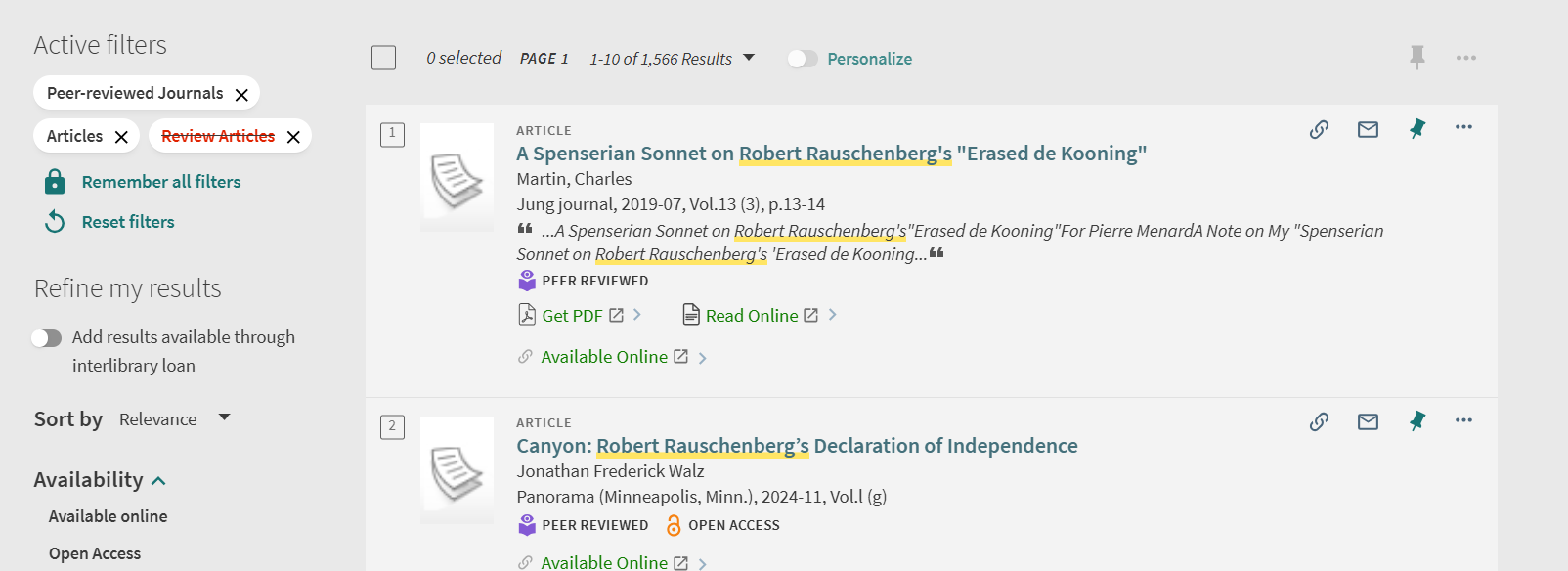
On the search results page, look under "Refine my results" on the left side.

Select "Peer-Reviewed Journals" and "Articles." 

To exclude other options, select the red box beside a filter, such as the one for "Review Articles" so that your results are limited to the type of article you want.

An example screenshot with these filters on would be this: 
 Image of Thrift Library catalog search features

Once you locate an item, open its record and scroll to the "View Online" section to see which database(s) provide access to it.

 Note that databases provide two types of search results:
          1. Actual sources, which include the full-text article.
          2. Surrogate records, which only provide the article's metadata such as the author's name, article and journal titles, publication information, and an abstract and/or summary. 

If the catalog record does provide access to the full-text of the article, follow the PASCAL Delivers instructions to request that it be emailed to you through interlibrary loan (ILL).

Select a database to access the article from the available options. If it provides full text, there should be an option to view/download a PDF. 


Additional Resources

2022-2023
Mometrix Test Prep
MCAT Prep Books

2021-2022
Test Prep Books
MC Prep Books

2017
AAMC - creators of the MCAT
The Official Guide to the MCAT Exam - AAMC